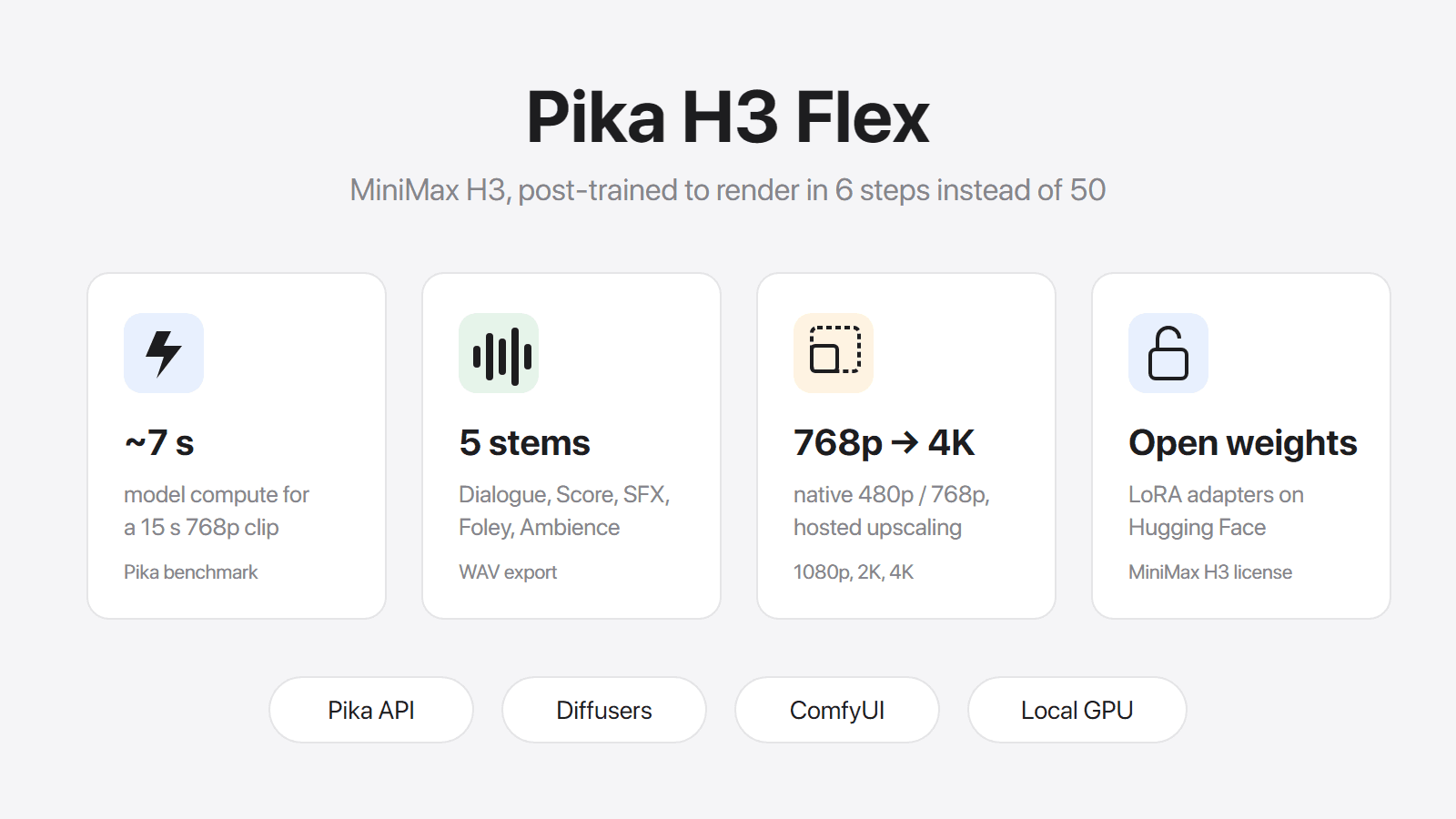
Pika H3 Flex is Pika's new video model: very fast, cheap per clip, with sound, and with weights you can download. Before you go looking for it in the Pika app, one thing to know: it isn't there. Flex runs through Pika's developer platform, the Pika API Club, or on your own hardware.
So the useful questions are: what does it give you, which way of running it fits you, what does a clip cost, and when is MiniMax H3, the model Flex is built on, still the better choice?
The short version
- You want to try it with no setup → Pika API Club at dev.pika.art. It is a developer platform, so expect an account, an API key and endpoints rather than a creator app.
- You already use ComfyUI → Pika supports it, with ready-made workflow templates.
- You have a data-center GPU → download the weights and run it yourself. A typical home PC is not enough (more on that below).
- You want to make a video in your browser right now → Flex isn't available that way. MiniMax H3, the model Flex is built from, is.
What Pika H3 Flex is good at
Flex is MiniMax H3 retrained by Pika to finish a clip in 6 generation steps instead of 50. That one change is where most of its appeal comes from.
Lots of tries, fast
Pika says Flex can generate a 15-second 768p clip "in as little as 7 seconds", and up to 1.8× faster than MiniMax H3 Max.
Don't expect a 7-second wait on your end. That figure counts only the time the model itself runs, in Pika's own test setup. Uploads, references, upscaling, sound separation and queueing all add time.
What the speed really changes is how you work. When each try is quick and cheap, you can test five camera moves or styles instead of betting on one, and keep only the take that works.
Sound you can actually edit
Every clip comes with stereo sound generated together with the picture: voices, music and effects. The new part is that you can export the soundtrack as up to five separate WAV files:
| Track | What's in it |
|---|---|
| Dialogue | Spoken lines |
| Score | Music |
| SFX | Sound effects |
| Foley | Footsteps, cloth, handling sounds |
| Ambience | Room tone, wind, crowd |
If you edit, this is a big deal. Keep the dialogue and swap the generated music for your own track. Turn down an effect that's too loud without touching the voice. Normally you'd need a separate tool to pull those apart. It costs $0.001 per second of audio and only works on Pika's hosted service.
Up to 4K, but upscaled
Flex creates video at 480p or 768p. On Pika's hosted service you can ask for 1080p, 2K or 4K, and Pika upscales the 768p video before it hands you the file.
That's fine for social clips. For small text, product labels or faces in wide shots, an upscaled 768p clip won't hold detail like a video made at 2K from the start. Compare before you use it for a final deliverable. If you run Flex yourself, you only get 480p or 768p, since the upscaler is part of Pika's service.
What you can feed it
| Pika H3 Flex | |
|---|---|
| Start from | A prompt, a first frame, a last frame, or both frames |
| References | Up to 9 images, 3 videos and 3 audio clips (12 total) |
| Edit a video | Replace an outfit, a prop or the world around your subject, guided by references |
| Clip length | 5–15 seconds |
| Frame rate | 24 fps |
| Shapes | 11 aspect ratios, from 21:9 to 9:21, including 16:9, 1:1 and 9:16 |
| Prompt | Up to 8,000 characters |
| File | MP4 with sound |
A few rules for references: each reference video or audio clip must be 2–15 seconds, with no more than 15 seconds per type in total. You also need at least one image or video; audio alone won't work.
How to use Pika H3 Flex
Option 1: Pika API Club (hosted)
This is where Pika itself sends you to try Flex. The model page on dev.pika.art has separate endpoints for text-to-video, image-to-video, reference-to-video, draft-to-video, audio stems and a prompt rewriter. Upscaling, stem export and prompt help all run on Pika's side, so you don't need a GPU.
Pika doesn't list the API Club membership price on the Flex page. As a launch promo, members got 15 free Flex generations a day from October 29 to November 5.
Outside that promo, you pay per second of video. Pika's launch price is half the regular price, and no end date has been announced. Here is what a clip costs:
| Clip | Launch price | Regular price |
|---|---|---|
| 5 s at 480p | $0.05 | $0.10 |
| 10 s at 768p | $0.20 | $0.40 |
| 15 s at 768p | $0.30 | $0.60 |
| 15 s at 2K (upscaled) | $0.60 | $1.20 |
| 15 s at 4K (upscaled) | $1.20 | $2.40 |
Per second, that's $0.01 (480p), $0.02 (768p), $0.035 (1080p), $0.04 (2K) and $0.08 (4K) at launch. Using references costs more, starting at $0.03 per second at 480p, and the length of any reference video is billed too. Reference images and audio are free.
A tip to save money: make your drafts at 480p or 768p. When you have a take you like, use draft-to-video to finish it at 1080p, 2K or 4K. Pika keeps the same take and sound, and you only pay the difference.
Option 2: ComfyUI
If ComfyUI is already part of your workflow, Flex fits in. The Hugging Face model page links to a ComfyUI tutorial and three ready-made workflow templates from the ComfyUI team. You still need a machine strong enough to run MiniMax H3, so the hardware note below applies.
Option 3: Run it on your own GPU
The weights are on Hugging Face and the code is on GitHub. Flex isn't a standalone model: it's a set of add-on files (LoRA adapters) that run on top of MiniMax H3, and MiniMax H3's own files take about 210 GB.
Be realistic about hardware. Pika validated 480p and 768p generations on an NVIDIA H100 with 80 GB of memory, a data-center GPU, and says bigger jobs may also need a lot of system RAM. Pika doesn't list results for consumer graphics cards. It also notes that your own setup won't necessarily be as fast as its hosted service.
If you're comfortable with Python, the model page shows how to load it with Hugging Face Diffusers. In short:
import torch
from diffusers import DiffusionPipeline

pipe = DiffusionPipeline.from_pretrained(
    "MiniMaxAI/MiniMax-H3", dtype=torch.bfloat16, device_map="cuda"
)
pipe.load_lora_weights("Pika-Labs/Pika-H3-Flex")
This is simplified; each input mode uses its own adapter, so follow the model page for the full setup.
Two things to check before you build on it:
- The license. Hugging Face lists the MiniMax H3 Community License. Read it before you use Flex output in paid client work or a product. Pika also asks for credit when you use it.
- Resolution. Running it yourself gives you 480p or 768p. If you need a sharper final file, run it through an upscaler afterwards.
Pika H3 Flex vs MiniMax H3: which one should you use?
Flex is MiniMax H3 made faster, so they share a lot: sound in every clip, the same reference limits, first and last frames. On the DesignArena text-to-video leaderboard shown on Pika's launch page, Flex scored 1293 and MiniMax H3 scored 1277. That's close, so picture quality alone shouldn't decide it.
| Pika H3 Flex | MiniMax H3 | |
|---|---|---|
| Where you use it | Pika API Club, ComfyUI, your own GPU | In the browser on Pilio, no setup |
| Made at | 480p or 768p | 768p or 2K |
| Best output | 4K, upscaled from 768p | 2K, made at 2K |
| Clip length | 5–15 s | 4–15 s |
| Sound | Stereo, plus 5 separate tracks | Stereo, dialogue in 11 languages |
| Download the model | Yes | No |
Use Pika H3 Flex if:
- You want to try many ideas quickly and cheaply before committing.
- You edit your sound and want dialogue, music and effects on separate tracks.
- You're comfortable with an API or ComfyUI, or have the hardware to run it yourself.
Use MiniMax H3 if:
- You want to type a prompt in your browser and get a video, without API keys or a GPU.
- The final video needs real 2K detail: readable signs, product labels, faces in wide shots.
- You need a 4-second clip (Flex starts at 5).
The two also work well together. Find the idea with quick Flex drafts, then make the final version with MiniMax H3 on Pilio at 2K. You see the credit cost before you generate. To try the same prompt on other models, use the AI video generator.
FAQ
Can I use Pika H3 Flex in the Pika app?
No. Pika points people to the Pika API Club at dev.pika.art. You can also run the open weights in ComfyUI or on your own GPU.
Is Pika H3 Flex free?
Partly. The weights are free to download, but you need serious hardware to run them. On Pika's API, members got 15 free generations a day from October 29 to November 5. Outside that promo, a 10-second 768p clip costs $0.20 at the launch price.
Can Pika H3 Flex make 4K video?
Yes, on Pika's hosted service, by upscaling a 768p video. If you run it yourself, you get 480p or 768p.
How fast is Pika H3 Flex?
Pika says a 15-second 768p clip can take as little as 7 seconds, up to 1.8× faster than MiniMax H3 Max. That counts only the model's own run time; your total wait will be longer.
Can I run Pika H3 Flex on my own PC?
Probably not on a typical gaming PC. Pika validated it on an NVIDIA H100 with 80 GB of memory and doesn't list results for consumer cards. It also needs MiniMax H3's roughly 210 GB of files.
Can I use Pika H3 Flex videos commercially?
Check the MiniMax H3 Community License that Hugging Face lists for the weights, and Pika's terms if you use its API. We don't summarize either here, because the details matter.
What's the difference between Pika H3 Flex and MiniMax H3?
Flex is MiniMax H3 retrained to work in 6 steps instead of 50. It's faster and cheaper per clip, adds separate audio tracks and can be downloaded. MiniMax H3 makes real 2K video, supports 4-second clips and is easy to use in a browser.
Sources: Pika H3 Flex launch page, Pika API model page, Hugging Face model card. Prices and the free-generation offer are as listed on October 29, 2026.